
Hello!
If you’re reading this page, that means you have some work soon to appear in Cordite Poetry Review. We’re pleased to have it and you.
Now. Always good to have a look-see online before it goes live to the world, so the following steps are how to do just that. If this is your first time appearing in Cordite Poetry Review, then your username is [first name][last name], e.g. joeblogs. Generally, no middle names or initials for login details (your live, displayed name will be in full). For new users, your password is [first name][last name][year of publication], e.g. joeblogs2020. If you’re having difficulty logging in, feel free to use the password reminder / reset mechanism.
**THIS IS NOT a fail-proof system, sadly, so if you cannot log in, please get in touch with us to troubleshoot.
STEP 1: Log in here. USE THE PASSWORD RESET / REMINDER LINK if needed.
STEP 2: At centre (or centre right, depending on device you’re using), you’ll see a Drafts area. The title(s) of your work should appear there.
*Please note that poems are coded to look as close to the author’s intent as possible on a desktop, laptop and most tablets. Many more poems will not render perfectly on mobile / cell phones.
STEP 3: Select your hyper-linked title.
STEP 4: You will be taken to the HTML construction screen. THIS IS NOT THE LAST STEP.
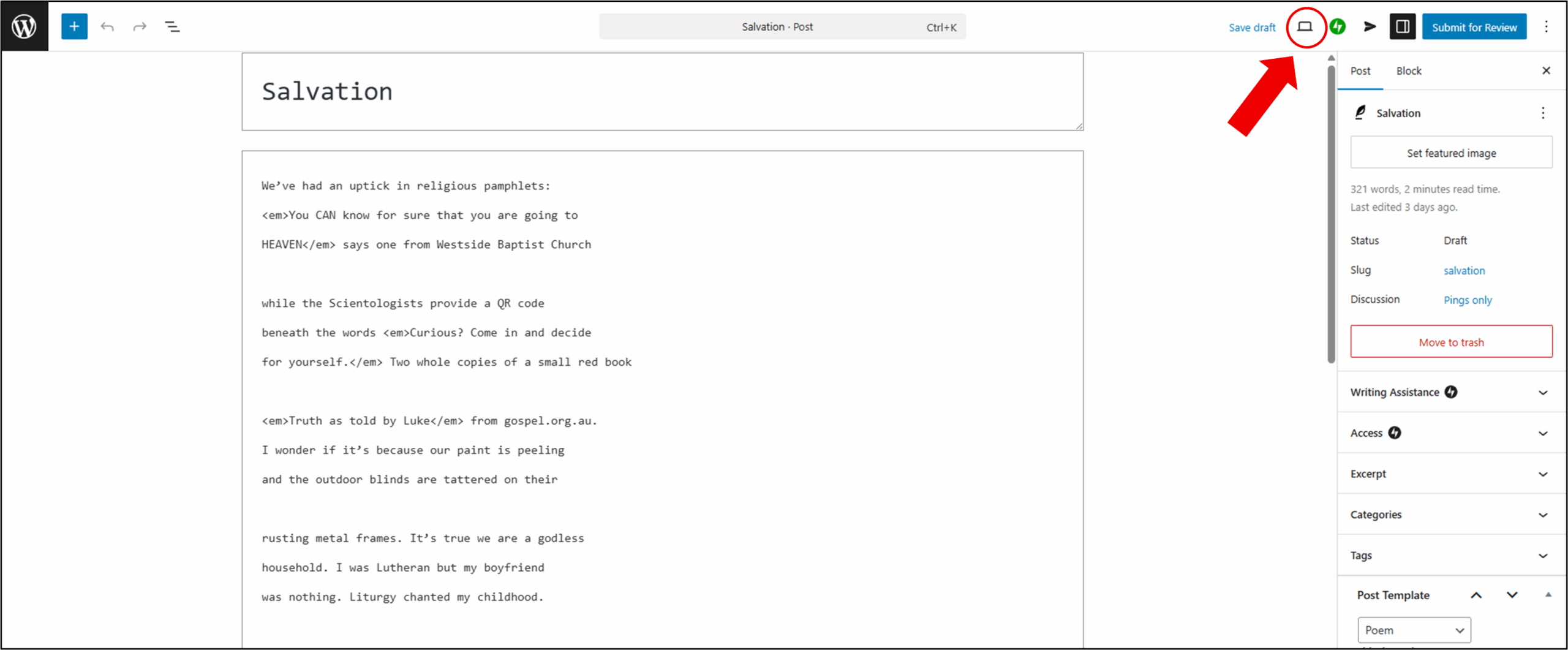
STEP 5: Select the PREVIEW (laptop) button at the top right (see image below).
STEP 6: This will spawn a new tab and display your work and how it will appear when published.
STEP 7: You’re welcome to make minor copy edits to the poems on the HTML construction page. If you do, please remember to select the SAVE button at top right before previewing again or logging out. OR … feel free to email us with requested edits or alterations to your poem or displayed author name.
If you don’t need to make any changes, no further action is needed.
*Note: Once a work is published, you will no longer have access to it as per the above … nor, for this matter, will anybody else but Cordite. Post-publication typo edits are possible, but other updates, later revisions or alterations will not be taken in.







52 Responses to How to Proof Your Work Online at Cordite